
AI Skills Gap Analysis: A Step-by-Step Guide for Organisations
What an AI skills gap analysis is, and why a survey alone is not enough
An AI skills gap analysis compares the AI skills each role needs with the skills people actually have, and shows where the difference matters most. Its output is not a single company-wide score. It is a map: which teams, which skills, which tasks.
Many organisations start with a self-assessment survey and stop there. The problem is that people are poor judges of their own AI skill. Heavy users often rate themselves highly while rarely checking what the tool produces, and cautious people underrate themselves. A reliable analysis combines three sources: what people say, what they can do on a real task, and what their manager sees.
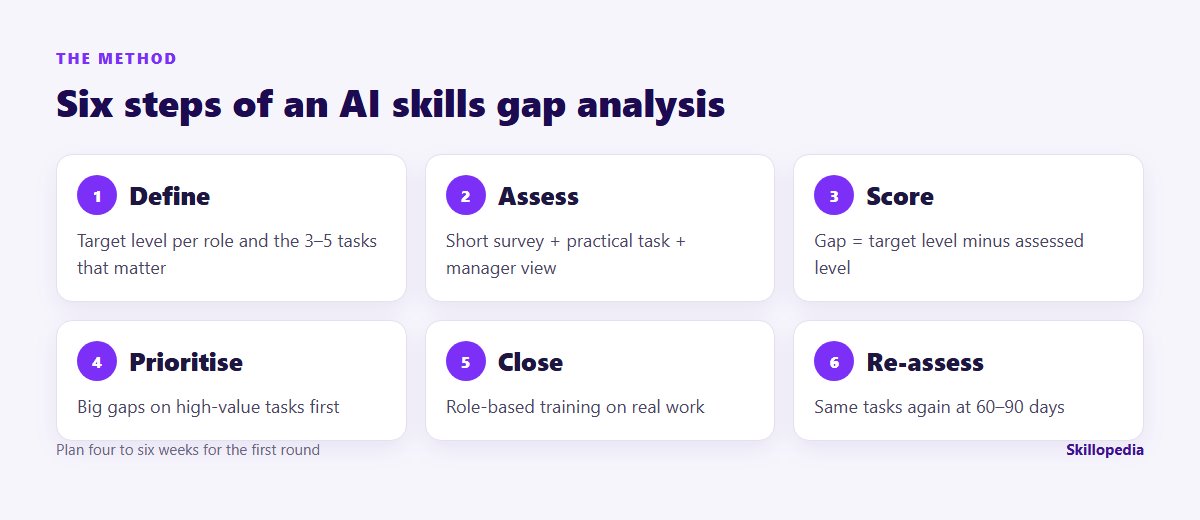
Step 1: Define the skills, and the target level for each role
Start with a short list of skill areas. Five are enough for most organisations:
- Safe and responsible use: knowing the company rules, what data may go into which tool, and the main risks.
- Prompting and briefing: giving the tool context, source material, a clear output and limits.
- Checking output: verifying facts and figures, spotting invented content, knowing when not to trust the result.
- Workflow redesign: seeing which parts of a job AI should take over and changing the process around it.
- Building: creating reusable assistants, automations or agents for a team.
Then use a simple proficiency scale and set a target level per role, not per person.
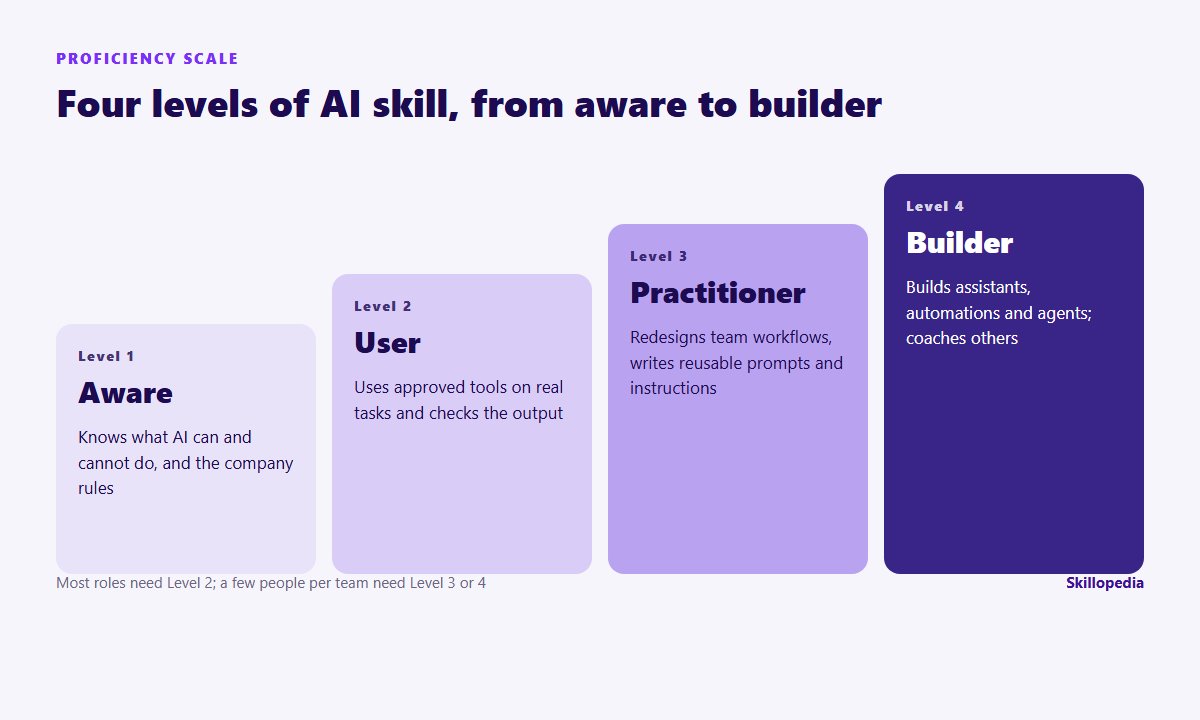
In most organisations, almost everyone needs Level 2, a few people in each team need Level 3, and a small number need Level 4. Senior leaders need at least Level 2 themselves, because they cannot judge AI-assisted work they do not understand.
Step 2: Pick the tasks that matter for each role
Skills only matter in the context of work. For each role, list three to five tasks where AI could make a real difference, and that happen often enough to be worth improving. For example:
- Finance: monthly variance commentary, reconciliation summaries, board pack preparation.
- HR: job descriptions, interview summaries, policy FAQs.
- Sales: account research, proposal drafts, call summaries.
- Procurement: RFQ drafts, quote comparisons, contract summaries.
Time each task as it is done today. These baseline numbers are what will later show whether training worked.
Step 3: Assess in three ways
A short self-assessment survey
Keep it under ten minutes. Ask about behaviour, not confidence. Sample questions:
- In the last two weeks, how often did you use an approved AI tool for work? (Never / once or twice / weekly / most days)
- Which of these tasks have you completed with AI? (list the role’s tasks from step 2)
- When AI gives you a figure or a fact, what do you usually do? (Use it / check it sometimes / always check it against the source)
- Which of these may you put into the company’s AI tool? (list examples, including some that are not allowed)
- Have you ever saved a prompt or instructions that you or your team reuse? (Yes / no)
- What stops you using AI more in your job? (open question)
The question about data is a quiet test of safe use: wrong answers here are one of the most useful findings of the whole exercise.
A practical task
This is the part most analyses skip, and the part that tells you the most. Give each person a 20 to 30 minute task from their own role, with realistic (redacted or synthetic) material, and score the result. A finance analyst might get three short monthly reports and be asked to produce a variance summary with AI. Score four things on a simple 0–3 rubric:
- Did they give the tool the source material and a clear brief?
- Is the output usable without major rework?
- Did they catch the deliberate error planted in the material?
- Did they keep restricted data out of the tool?
The manager’s view and usage data
Ask managers one question per person: “Could you rely on this person’s AI-assisted work in a client-facing or board document today?” If your organisation uses enterprise plans of ChatGPT, Copilot, Claude or Gemini, admin dashboards also show who is active. Use these figures for context, not as a score: frequent use is not the same as good use.
Steps 1 and 2 are where most programmes are won or lost
Step 4: Score the gaps and map them by team
For each person and skill, the gap is the target level for their role minus the assessed level, where the practical task carries the most weight. Then aggregate by team. A heatmap makes the result easy to read for leadership.
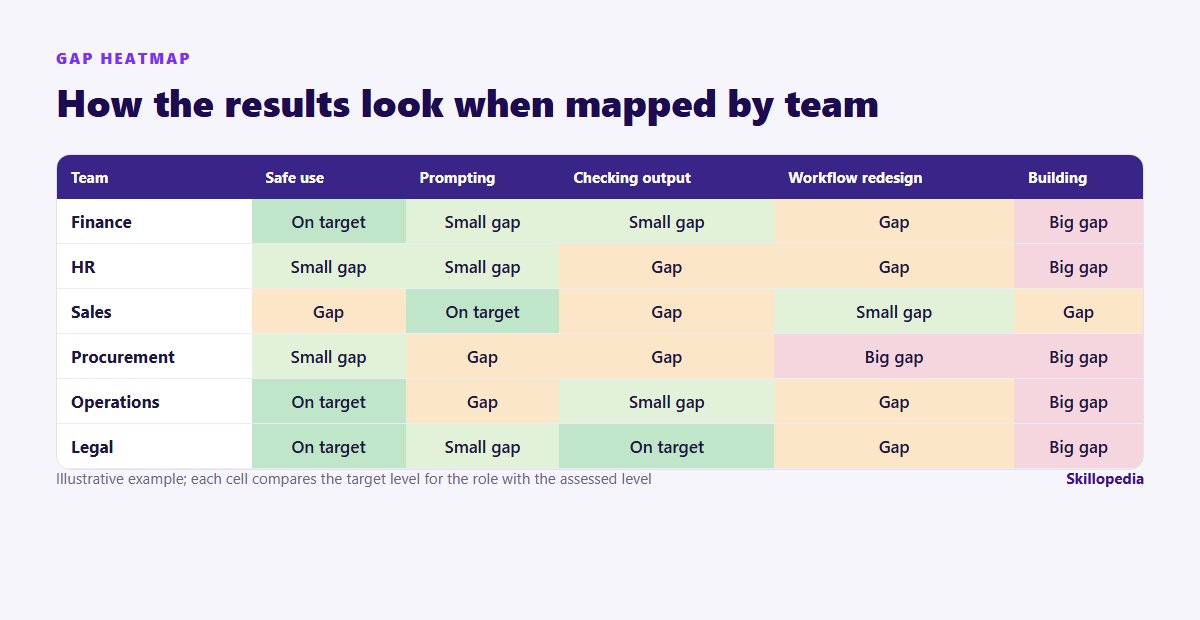
Patterns you are likely to see:
- Safe-use gaps concentrated in a few teams, often where the tool arrived without any briefing.
- Good prompting but weak checking among enthusiastic users.
- Almost nobody at Level 4, which is normal; you only need a few.
- Managers behind their teams, which slows everything else down.
Step 5: Prioritise and close the gaps
Not every gap deserves training. Prioritise where a large gap meets a frequent, high-value task, and where a safe-use gap creates real risk. Then match the response to the gap:
Once you know which gaps to close first, compare AI training programmes for employees by tier, format and cost.
- Safe-use gaps: a short, mandatory briefing and a one-page usage rule. Our guide to AI literacy training for employees covers what this should include.
- Prompting and checking gaps: hands-on sessions on each team’s own tasks, not generic demos. Function-specific training works best, for example our programmes for finance, sales and HR teams.
- Workflow and building gaps: a smaller group of champions per team, given time to redesign processes and build shared tools.
Step 6: Re-assess on the same tasks
After 60 to 90 days, run the practical task again and re-time the baseline tasks from step 2. This is the only honest way to show progress: same people, same kind of task, before and after. Our guide on measuring the ROI of AI training explains how to turn those timings into figures finance will accept.
Common mistakes
- Measuring confidence instead of competence. A survey on its own mostly measures enthusiasm.
- One target for everyone. A procurement officer and a data analyst do not need the same level in the same skills.
- Ignoring the rules. If people do not know what data may go into which tool, that is the most urgent gap, whatever their prompting skill.
- Analysing and never re-assessing. Without a second round, you cannot show what changed.
- Treating it as a one-off. AI tools change every few months; a light re-assessment each year keeps the map current.
Do you need to run this yourself?
A small organisation can run a simple version internally: a survey, one practical task per role and a spreadsheet. Larger organisations often bring in outside help for the practical tasks and the scoring, because building realistic tasks for many roles takes time and a neutral assessor gets more honest answers. Either way, the method matters more than the tool. If your company is also rolling out a specific assistant, our Copilot rollout plan shows how a gap analysis fits into the wider rollout.
Where a gap is best closed by an individual course, our lists of AI courses for HR professionals, finance professionals and chartered accountants and managers and leaders compare the options available in India.
Questions people ask
The target levels start with leadership
About Skillopedia
Skillopedia is a corporate AI training firm, established in 2017, running hands-on programmes for teams across India, the GCC, Africa and Southeast Asia, with on-site and online sessions across the UAE. We have trained 200,000+ professionals from 335+ organisations in 13 industry sectors. More about us