
How to Use AI in Sales: A Practical Guide for Reps and Sales Managers
What AI is good at in sales, and what it is not
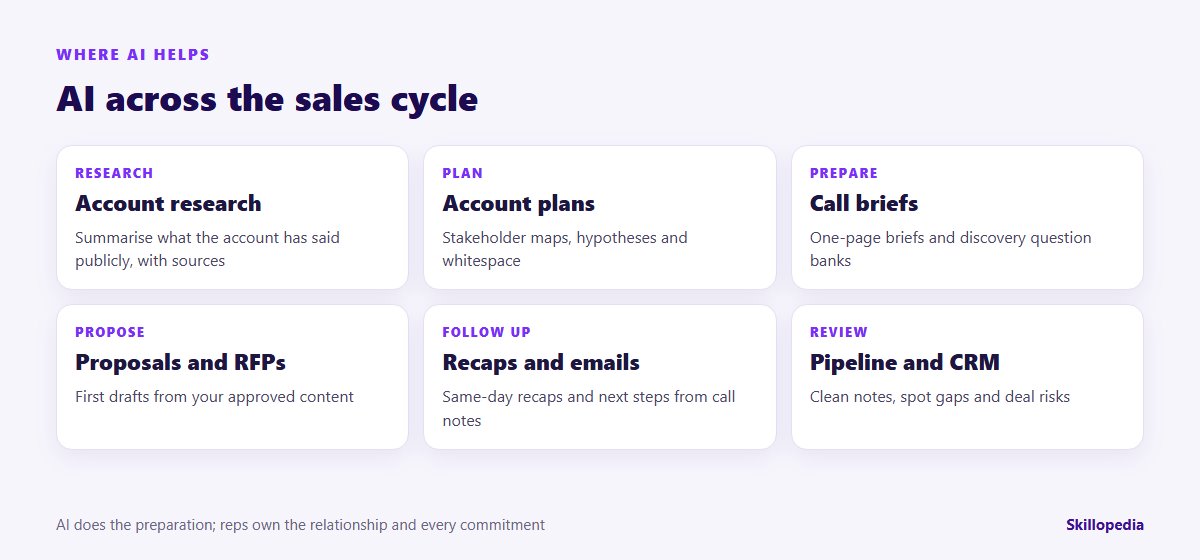
Selling is mostly reading, writing and preparing: annual reports, LinkedIn posts, call notes, emails, proposals and CRM updates. AI assistants such as ChatGPT, Microsoft Copilot, Claude and Gemini, along with the AI features now built into most CRMs, are quick at all of that. They can summarise a 200-page annual report into what matters for your pitch, turn rough call notes into a clean recap and produce a first draft of a proposal section in minutes.
What they can’t do is know your buyer. They don’t know that the CFO was burnt by a failed rollout two years ago, that procurement only buys through a framework agreement, or that your champion is about to move roles. Left to themselves, they also fill gaps with plausible guesses, which is how a rep ends up congratulating a prospect on an acquisition that never happened. The working rule:
- AI researches, prepares, drafts and tidies.
- Reps build the relationship, verify the facts and make every commitment.
Before you start: four things to agree
- Which tool. Use the AI tool your company has approved on a work account, or the AI features in your CRM if they have been switched on. Don’t paste customer contracts, pricing or contact lists into a personal chatbot.
- What data may go in. Company information is usually fine; personal data about contacts is regulated. India’s Digital Personal Data Protection Act and the UAE’s Personal Data Protection Law both apply to prospect and customer details, so use what the task needs and nothing more.
- What stays human. Pricing, discounts, contract terms, delivery promises and anything said in the customer’s name.
- A baseline. Note how long reps spend on call prep, proposals and CRM updates, and your proposal turnaround time, before you change anything.
New to AI at work? Our guide to AI literacy training for employees covers the basics every rep should know first.
Nine sales workflows, step by step
Each workflow has a prompt you can adapt. Replace the brackets, paste only real sources and read every output before it reaches a customer or the CRM.
1. Account research from real sources
The biggest mistake is asking an AI “tell me about Company X” and trusting the answer. Instead, give it the sources and ask it to work only from them.
If your approved tool has web search, you can ask it to find sources too, but open the links and check them yourself before using anything in a conversation.
2. Account plans for key customers
For strategic accounts, AI can turn a scattered set of notes into a structured plan the whole account team can work from.
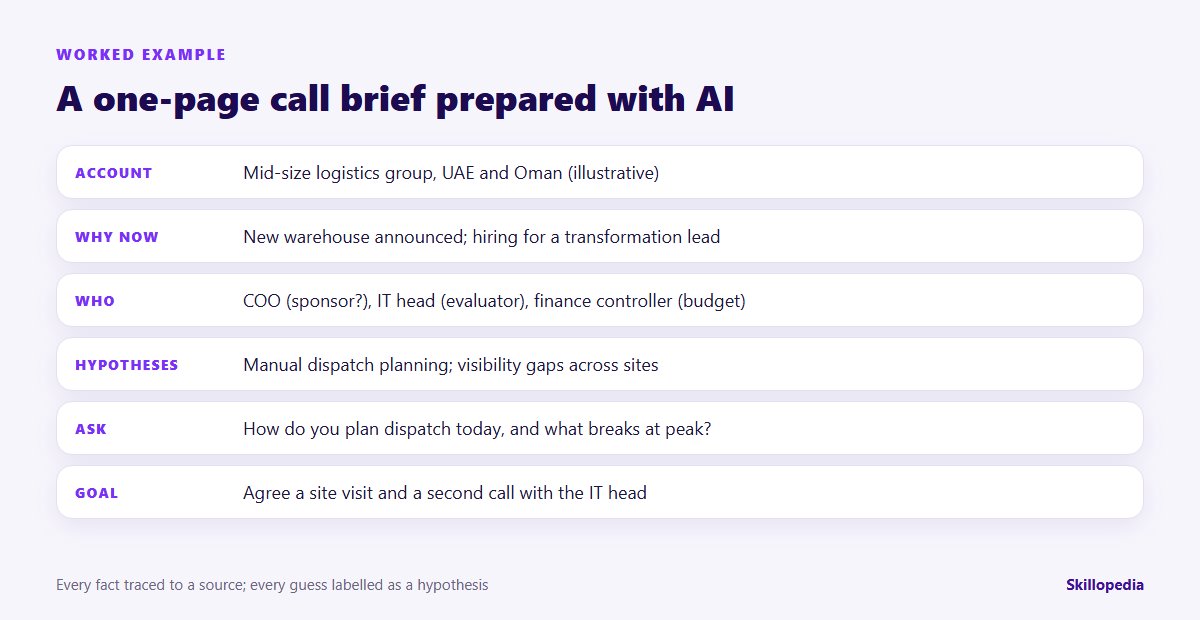
3. A one-page call brief
Good call prep is the habit that separates strong reps from busy ones. AI makes it quick enough to do for every call, not just the big ones.
4. A discovery question bank by persona
Ask a team to share their best discovery questions and you will get a dozen documents. AI can turn them into one bank, organised by buyer role and deal stage.
The output is a draft for your sales manager to approve, then a shared asset the whole team uses.
5. Same-day recaps and follow-ups
A clear recap within hours of a meeting is one of the simplest ways to look professional and keep deals moving. AI can turn your notes or an approved meeting transcript into one.
That second instruction catches the “we can probably do that by month-end” remarks that turn into problems later. If you record calls, follow your company’s consent policy and local law; tell participants when a meeting is being recorded or transcribed.
6. Proposals and RFP responses
Proposals are where AI saves the most hours, and where careless use does the most damage. The safe pattern is to work from your own approved content, not the open internet.
Every claim about delivery, timelines, security or pricing must be checked by the person who owns it. AI drafts the words; it can’t sign up your delivery team to a promise.
7. Objection handling practice
AI makes a patient role-play partner. Reps can rehearse tough conversations before they happen, without taking a manager’s time for every practice round.
Want the whole team selling this way?
8. CRM notes that people actually trust
Most CRMs are only as good as the notes reps find time to write. AI can turn rough notes into structured updates, and point out what is missing.
Many CRM platforms now include AI features that summarise emails and calls into the record. The same rule applies: the rep reads and corrects the summary before saving it.
9. Pipeline reviews for sales managers
Managers can use AI to prepare for a pipeline review rather than run it. Give it an export of open deals and ask where to look first.
Use the flags to start conversations, not to judge reps automatically. The rep usually knows something the export doesn’t.
Worked example: preparing a discovery call in 20 minutes
Here is the call-brief workflow in practice for an illustrative case: a rep selling planning software, preparing a first call with a mid-size logistics group in the UAE and Oman.
- Gather sources (5 minutes). The rep saves the group’s latest press release about a new warehouse, its careers page showing a transformation lead vacancy, and the CRM note from an inbound enquiry.
- Run the research prompt (2 minutes). The summary lists the warehouse expansion and the hiring push, each with its source, and three hypotheses including manual dispatch planning across sites.
- Run the call-brief prompt (2 minutes). The brief suggests the COO is the likely sponsor, the IT head an evaluator and the finance controller the budget holder, with six discovery questions.
- Check and correct (8 minutes). The rep spots that the AI described the company as “recently acquired”, which no source supports, and deletes it. She swaps one generic question for a sharper one: “How do you plan dispatch today, and what breaks at peak?”
- Set the goal (3 minutes). She decides the call succeeds if the customer agrees to a site visit and a second call with the IT head.
The brief took 20 minutes instead of an hour, and the most valuable step was the check that removed an invented fact before it reached the customer.
Guardrails for AI in sales
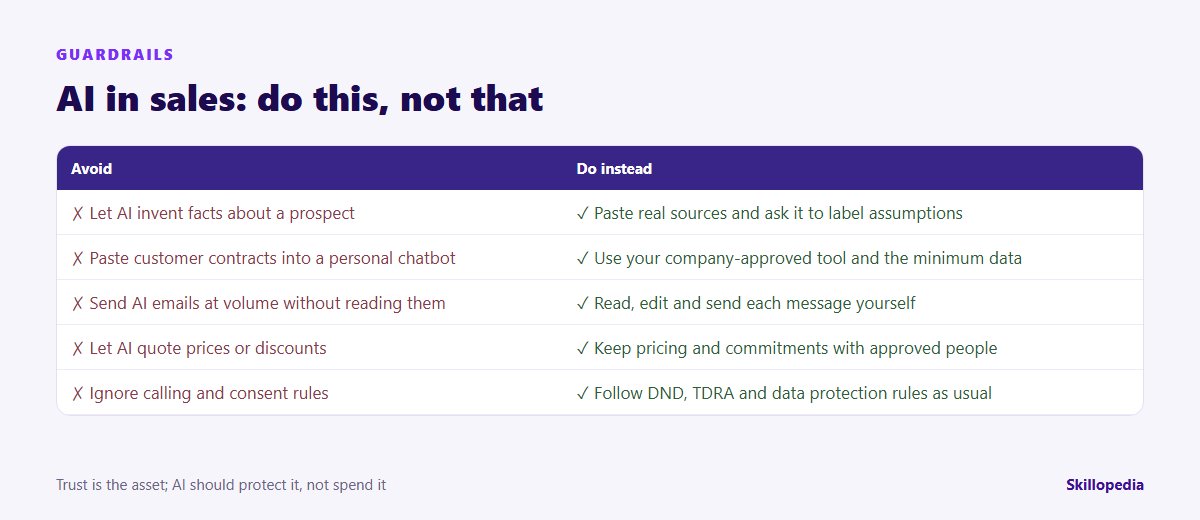
- No invented facts. Work from pasted sources and ask AI to label assumptions.
- Read everything before it is sent. Mass-produced “personalised” emails that nobody read damage your domain reputation and your brand.
- Pricing and promises stay human. AI can explain your price list; only approved people can offer discounts or commit to delivery dates.
- Respect calling and consent rules. AI doesn’t change your obligations. In India, commercial calls and messages fall under TRAI’s rules, including the DND preference register. In the UAE, telemarketing is regulated under Cabinet Resolution No. 56 of 2024, which requires TDRA approval and restricts calling hours, among other conditions. Check the current rules with your compliance team.
- Protect customer data. Minimum data, approved tools, and nothing confidential in personal accounts.
Which workflow to start with
| Workflow | AI does | The rep or manager does | Good first step for |
|---|---|---|---|
| Call briefs | Summarises sources, drafts questions | Verifies facts, sets the call goal | Every rep |
| Recaps and CRM notes | Structures notes, drafts the email | Checks commitments, sends, saves | Teams with patchy CRM data |
| Proposals and RFPs | Compliance matrix, first drafts | Owners approve every claim | Bid and pre-sales teams |
| Objection practice | Plays the buyer, gives feedback | Practises, refines the playbook | New joiners |
| Pipeline review | Flags stale or thin deals | Coaches, decides the forecast | Sales managers |
Common mistakes to avoid
- “Write me a cold email” with no context. Generic prompts produce generic emails that buyers recognise instantly. Give the AI the account research and one specific reason to reach out.
- Personalisation theatre. Mentioning a prospect’s latest post in the first line isn’t personalisation if the rest of the email ignores their situation.
- Letting AI do the thinking in discovery. The question bank prepares you; listening is still your job.
- Skipping the manager. Teams adopt faster when managers use the same prompts in pipeline reviews and coaching.
- No measurement. Track prep time, proposal turnaround and CRM completeness before and after. Our article on measuring the ROI of AI training shows how to keep the numbers credible.
A 30-day starter plan for a sales team
- Week 1: agree the tool, data rules and the “stays human” list; record baseline times for call prep, proposals and CRM updates.
- Week 2: practise account research and call briefs on five real accounts; collect the prompts that work in a shared library.
- Week 3: use call briefs, recaps and CRM notes on live deals; managers review a sample each week.
- Week 4: add proposals or objection practice, re-measure, and decide what becomes standard in your sales process.
Reps and managers rarely start at the same level, so an AI skills gap analysis helps decide who needs what. Once deals close, the handover matters too: our guides on AI in customer service and AI in accounting cover the teams that look after the customer and the invoice.
Questions people ask
Sales is only as fast as the rest of the business
About Skillopedia
Skillopedia is a corporate AI training firm, established in 2017, running hands-on programmes for teams across India, the GCC, Africa and Southeast Asia, with on-site and online sessions across the UAE. More about us