
How to Use AI in Accounting: A Practical Guide for Finance Teams
What AI is actually good at in accounting
Accounting looks like a numbers job, but a surprising share of the day is language: reading contracts and invoices, writing emails to vendors and customers, explaining differences, documenting processes and answering questions from managers and auditors. General-purpose AI assistants such as ChatGPT, Microsoft Copilot, Claude and Gemini are good at exactly that kind of work. They read quickly, summarise well, write a decent first draft and can explain a messy spreadsheet in plain English.
They are not reliable calculators, and they don’t know your business. A language model can add up a column incorrectly and present the answer with complete confidence. It doesn’t know that last month’s accrual was reversed late, that a customer has a side agreement on payment terms, or that the auditors flagged revenue cut-off last year. So the working rule for an accounting team is:
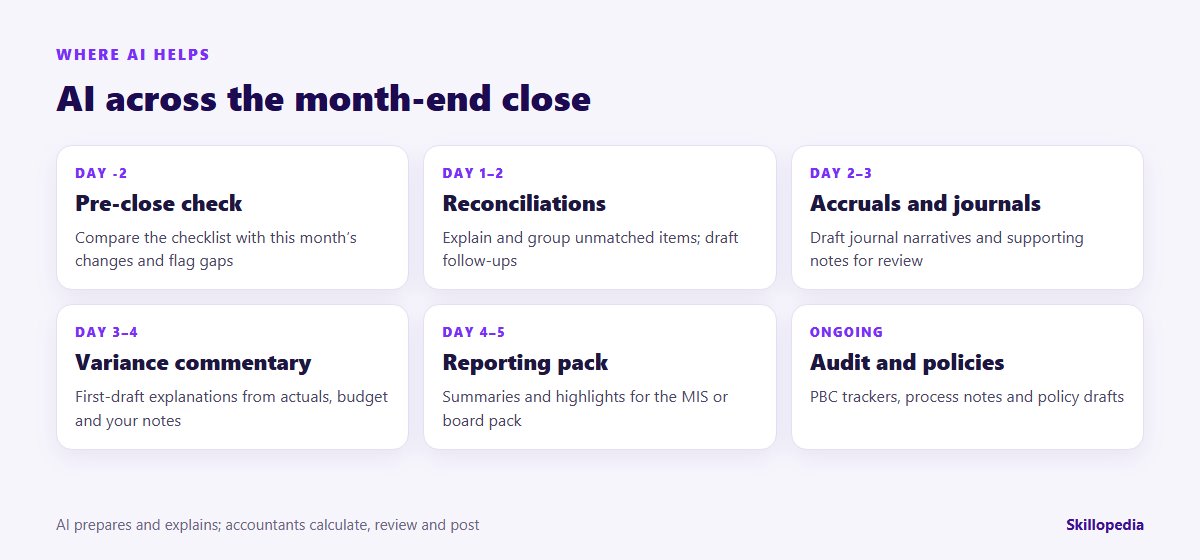
- Excel, the ERP and your reconciliation tools do the maths.
- AI reads, sorts, explains and drafts.
- Accountants check, decide, approve and post.
Keep that split in mind and AI becomes a fast, tireless junior who never minds rewriting the commentary a fourth time. Forget it and you get confident numbers nobody can trace.
Before you start: five things to settle
- Which tool. Use the AI tool your organisation has approved, on a work account. Business and enterprise plans of the major assistants generally offer stronger data protections than personal accounts, but check the terms your IT team has signed rather than assuming. Never paste ledger extracts or client data into a personal chatbot.
- What data may go in. Trial balances and budget files are usually commercially sensitive rather than personal, but vendor and customer ledgers, payroll and expense claims contain personal data. India’s Digital Personal Data Protection Act, whose rules are being phased in through 2027, and the UAE’s Personal Data Protection Law both apply to that information. Agree with your data protection lead what may be used, and mask names, bank details and employee IDs you don’t need.
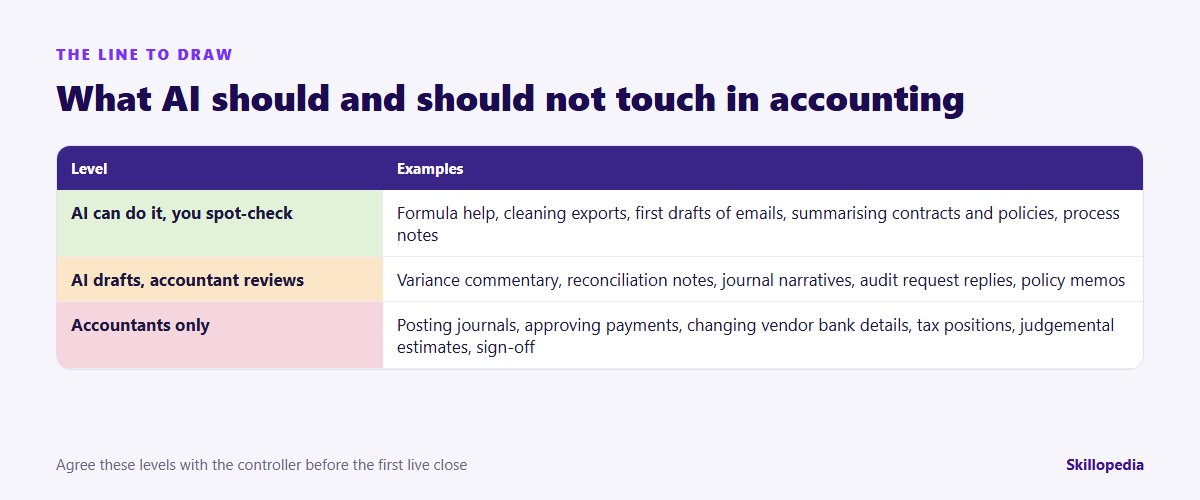
- Where the line is. Decide which outputs AI may draft and which stay entirely with people (see the table below).
- Who reviews. Every AI-assisted output needs a named reviewer, exactly as a junior’s working paper would.
- A baseline. Note how many working days your close takes, how long commentary takes to write and how many review points come back, before anything changes.
If parts of the team have never used AI at work, start with the basics; our guide to AI literacy training for employees covers what everyone should know before the first live file.
Eight accounting workflows, step by step
Each workflow below includes a prompt you can adapt. Paste only what the task needs, mask what you can, and read every output before it goes anywhere.
1. Pre-close: find the gaps in your checklist
The cheapest mistakes to fix are the ones you catch before the close starts. Give the AI your standard close checklist and a plain list of what changed this month.
The last line matters. You want ideas and reasons, not invented numbers. In this example, a good answer should prompt you to think about lease accounting under Ind AS 116 or IFRS 16, a final settlement accrual for the leaver and whether the supplier increase affects inventory costing.
2. Reconciliations: explain and group the exceptions
Matching is best done by your ERP, reconciliation software or a well-built Excel file. Where AI earns its keep is in the step after matching: making sense of the unmatched items.
The same pattern works for GST in India. Input tax credit generally depends on the supplier’s invoice appearing in GSTR-2B, so many teams reconcile 2B against the purchase register every month. Let Excel or your GST software do the match, then ask AI to sort the mismatches (missing in 2B, amount differences, GSTIN or invoice number typos) and draft polite follow-up emails to the vendors concerned.
3. Accounts payable: queries, follow-ups and red flags
AP teams spend hours on vendor emails. AI can draft replies to statement queries, summarise long email threads before a payment run and turn a vendor statement reconciliation into a clear list of what is disputed and why.
One firm rule: AI can help you notice an email asking to change a vendor’s bank details, but it must never be part of approving the change. Verify those requests by calling a known contact on a number you already hold, as your policy requires.
4. Accounts receivable: collections that stay polite
Collections emails are a good fit because tone matters and the facts are easy to check. Give AI the ageing, the customer’s history and your tone guide, and ask for a draft at the right level of firmness.
Ageing commentary for the monthly pack works the same way: give AI the ageing summary and your notes on key accounts, and ask for a short paragraph on movements and risks.
5. Variance commentary: from numbers to narrative
This is where most finance teams feel the time saving first. Writing clear commentary on 30 lines of a P&L takes hours; reviewing a good first draft takes a fraction of that. See the worked example later in this guide.
6. Journals and accruals: narratives, not postings
AI can draft the supporting narrative for a journal, a standard accrual memo or the description field that auditors will read later. It should not decide the amount or post anything.
Rolling this out across a finance team?
7. Audit preparation: PBC lists and process notes
Audit season brings long “prepared by client” lists and questions about how processes really work. AI is useful for organising the list, drafting process narratives from your SOPs and turning walkthrough notes into something readable.
Audit replies should always be reviewed by the person who owns the area. If a reply makes a claim about a control, that person must be able to evidence it.
8. Policies and technical memos: a first draft to argue with
AI can produce a solid first draft of an expense policy, a capitalisation threshold note or a summary of how a standard applies to a transaction. Treat it as a starting point, never as the authority.
Then check every requirement against the actual text of the standard and your auditors’ view. UAE entities reporting under IFRS can use the same pattern with IFRS 16. For tax matters such as GST in India or VAT and corporate tax in the UAE, use AI to organise the facts and the questions, and leave the conclusion to a tax professional using current official guidance.
Using AI inside Excel
Much of accounting lives in spreadsheets, so this is often where the habit forms.
- Formula help. Describe what you need in words (“sum the invoice amount where the vendor is in column B and the date falls in September”) and ask for the formula, with an explanation. Test it on a few rows you can check by hand.
- Explaining inherited files. Ask an assistant to walk through the logic of a workbook someone else built, sheet by sheet. It is a quick way to find hard-coded numbers and broken links.
- Cleaning exports. Ask for Power Query steps to split, trim and standardise ERP exports so the same clean-up runs every month.
- Copilot in Excel. If your organisation licenses Microsoft 365 Copilot, Copilot in Excel can suggest formulas, add calculated columns, highlight and summarise data. It typically needs the file saved to OneDrive or SharePoint. Our Microsoft Copilot rollout plan explains how to introduce it team by team.
Worked example: September variance commentary
Here is how the variance workflow plays out for an illustrative distribution company (the figures are invented for this example).
- Calculate in Excel first. The analyst prepares actual vs budget by P&L line. Marketing shows ₹18.4 lakh against a budget of ₹12.0 lakh, a variance of ₹6.4 lakh (53%). Freight shows ₹31.2 lakh against ₹27.5 lakh.
- Add the known drivers. The analyst types short notes: “Marketing: trade fair in Dubai brought forward from November. Freight: supplier rate increase from 1 Sept, plus two urgent air shipments.”
- Run the variance prompt from workflow 5 with the table and the notes.
- Read the draft. The AI writes: “Marketing costs were ₹6.4 lakh (53%) above budget, mainly because the Dubai trade fair originally planned for November took place in September. This is a timing difference and full-year spend is expected to be in line with budget.” The second sentence is a guess: nobody said the full-year budget would hold.
- Review and correct. The reviewer deletes the unsupported full-year claim, checks both figures against the ledger, and asks the marketing manager whether November’s budget will now be released. Freight commentary comes back with “Driver to be confirmed” for part of the variance, which correctly prompts a look at the air shipment invoices.
- Record it. The final commentary, the prompt and the reviewer’s initials are saved with the month’s working papers.
The time saving comes from steps 3 and 4. The value comes from step 5: the reviewer caught a confident sentence that wasn’t supported by any fact.
Review controls that keep AI-assisted work defensible
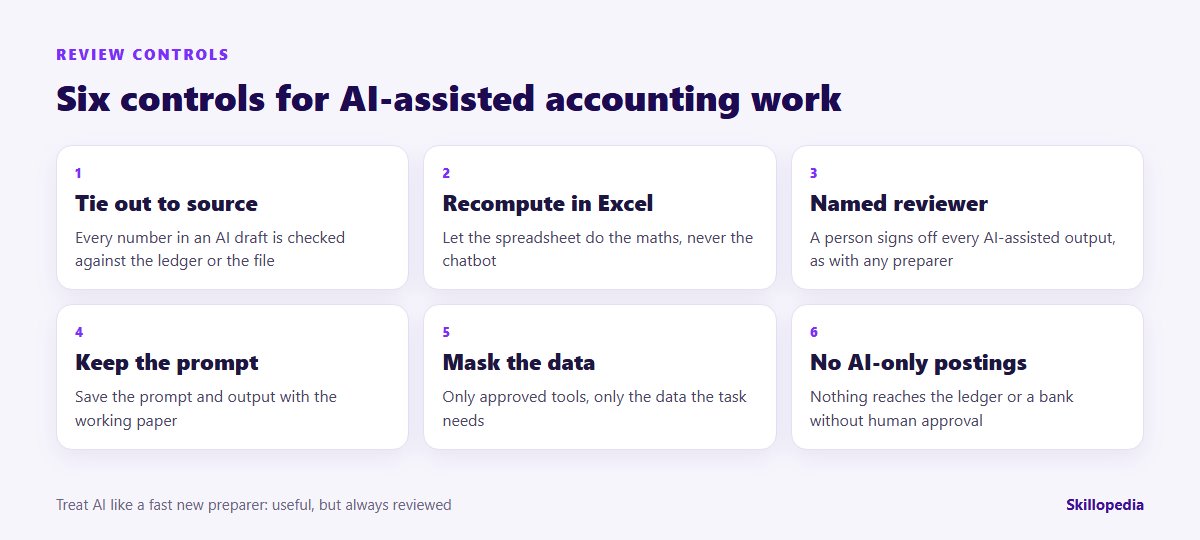
Auditors and regulators care about the quality of evidence and review, not about which tool drafted a paragraph. Build these controls into the close, not on top of it:
- Tie out every number in an AI draft to the ledger or the source file.
- Recompute in Excel any figure the AI produced or restated.
- Name a reviewer for every AI-assisted output and keep their sign-off.
- Keep the prompt and the output with the working paper where the work is material.
- Mask data and use only approved tools.
- No AI-only postings. Nothing reaches the ledger, a bank portal or a tax return without a person approving it.
What not to automate
Some tasks should stay with people however good the tools become:
| Task | Why it stays with people | How AI can still help |
|---|---|---|
| Posting journals | Accountability and segregation of duties | Draft the narrative and supporting note |
| Approving payments and bank detail changes | Fraud risk; needs independent verification | Flag unusual requests for a person to check |
| Judgemental estimates (provisions, impairment, expected credit loss) | Need business knowledge and documented judgement | Organise the evidence and list the assumptions |
| Tax positions and filings | Rules change; liability sits with the business | Summarise facts and prepare questions for the adviser |
| Final sign-off of accounts | Professional and legal responsibility | Prepare review checklists and a summary of open points |
Common mistakes to avoid
- Asking AI to do the arithmetic. Calculate in Excel, then ask AI to explain.
- Accepting “plausible” commentary. If a sentence isn’t supported by your notes or the data, delete it.
- Pasting whole ledgers. Send the extract the task needs, with personal details masked.
- Everyone writing their own prompts. Agree a shared prompt library for the close so outputs are consistent and reviewable.
- Skipping the baseline. Without “before” numbers you can’t show the time saved. Our article on measuring the ROI of AI training explains how to keep that evidence honest.
A 30-day starter plan for a finance team
- Week 1: agree the tool, the data rules and the three levels; record the baseline for the last close.
- Week 2: practise variance commentary and reconciliation notes on last month’s (masked) files; save the prompts that work in a shared document.
- Week 3: use two workflows in the live close with a named reviewer for each output.
- Week 4: compare with the baseline, collect review points and decide which workflows become part of the close calendar.
Finance teams rarely start from the same level. If you want to know who needs which training before you begin, an AI skills gap analysis shows how to find out. And because so much of AP depends on what happens upstream, our guide to AI in procurement is worth sharing with your purchasing colleagues.
For individual learning, including ICAI’s AICA certificate levels, see our comparison of AI courses for finance professionals and chartered accountants.
Questions people ask
Make the new habits stick after the workshop
About Skillopedia
Skillopedia is a corporate AI training firm, established in 2017, running hands-on programmes for teams across India, the GCC, Africa and Southeast Asia, with on-site and online sessions across the UAE. More about us