
How to Use AI in Operations: SOPs, Handovers, RCAs and MIS, Step by Step
What AI is good at in operations, and what it is not
It helps to separate two kinds of AI in operations management:
- Predictive and optimisation models forecast demand, plan routes, schedule maintenance from sensor data or inspect products with cameras. These need data engineering, system integration and usually a vendor or a data team. They are projects, not habits.
- Generative AI assistants such as ChatGPT, Microsoft Copilot, Claude and Gemini read, summarise, compare and draft. Your company may already licence one. Used well, they take hours out of the documentation, communication and reporting that surround every operation.
This guide is about the second kind. The rule of thumb for an operations team is simple:
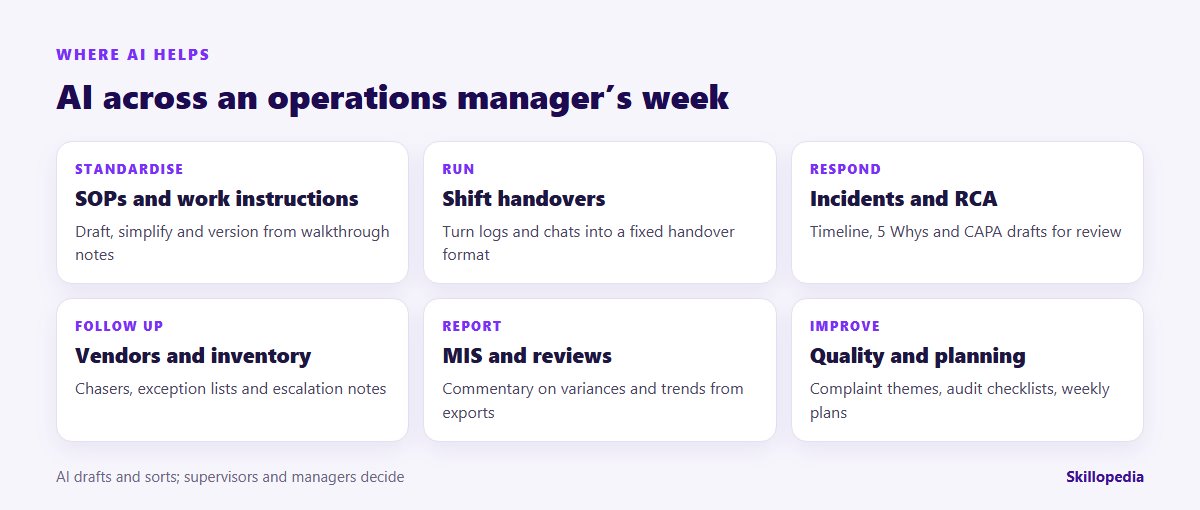
- AI prepares: drafts of SOPs, handover notes, incident timelines, chasers, report commentary and checklists.
- People decide: what the root cause is, what gets released, which vendor is escalated, what goes to a customer and anything to do with safety.
Before you start: three things to settle
- Which tool, on which account. Use the assistant your company has approved, signed in with your work account. If you are unsure which one that is, ask IT before you paste anything in.
- What may go into it. Agree what is off limits with IT, quality and HSE. Typical exclusions: personal data of employees and customers beyond what is needed (both India’s Digital Personal Data Protection Act, 2023 and the UAE’s Personal Data Protection Law apply to personal data), customer drawings or formulations covered by confidentiality agreements, and anything that is restricted under your security policy.
- A baseline. Time three tasks by hand before you start: for example, writing one SOP revision, preparing one shift handover and producing the monthly MIS commentary. Without these numbers nobody can show later whether AI helped.
Not sure which operations tasks to start with? Our guide on how to identify AI use cases gives a scoring method you can run with your supervisors in ninety minutes.
Eight operations workflows, step by step
The prompts below are starting points. Replace the bracketed parts, attach the source material rather than describing it, and always read the output against the source.
1. Write and refresh SOPs
SOPs go stale because rewriting them is tedious. AI is good at turning a supervisor’s walkthrough notes, a voice-note transcript or an old SOP into a clean draft in your standard format, and at flagging steps that are vague.
Ask for a second version in plain language for new joiners, or a translation into the language your shift teams use, and have a bilingual supervisor check it. The approved SOP still goes through your normal document control and sign-off.
2. Make shift handovers consistent
Handovers fail when the outgoing shift is tired and the notes are scattered across a logbook, a WhatsApp group and the system. A fixed template, filled by AI from those sources and checked by the supervisor, makes them consistent.
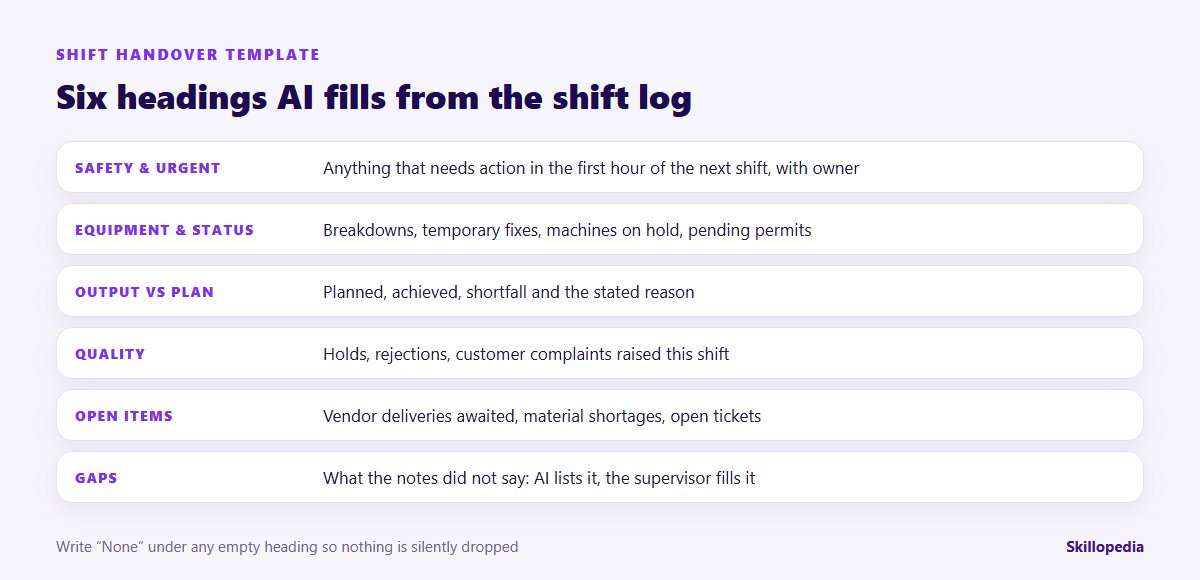
The “Gaps” heading is the most useful part. The AI cannot know what happened on shift; it can only show what the notes failed to say, so the outgoing supervisor can fill it in before leaving.
3. Draft incident reports and root-cause write-ups
After a breakdown, a quality escape or a near-miss, the write-up takes longer than it should. AI can build the timeline from logs and statements, structure a 5 Whys or fishbone discussion and draft the report in your format. It cannot find the root cause; your team does that, with evidence from the floor.
Used this way, AI shortens the paperwork without shortcutting the thinking. If your plants use 8D for customer complaints, the same approach works for the D2 problem description and the D4 cause analysis worksheets.
4. Chase vendors without writing every email
Operations teams spend hours chasing late deliveries, missing documents and service visits. Export your open purchase orders or service tickets, and ask AI to draft follow-ups graded by urgency.
A person reads and sends every message. If procurement owns supplier relationships in your company, agree who sends what; our guide on how to use AI in procurement covers the buying side.
5. Investigate inventory exceptions
Stock-outs, negative stock, slow movers and mismatches between system and physical counts all generate lists that someone has to work through. AI is good at grouping exceptions and suggesting what to check first.
Adjustments to stock in the system remain a human decision with the usual approvals.
Want your supervisors practising on their own logs and SOPs?
6. Write the MIS commentary
The numbers in a monthly operations review usually come from the ERP or a spreadsheet. The commentary, the part leadership actually reads, is where time goes. Give AI the checked figures and ask it to explain them.
Reconcile every figure in the draft against the source before it goes anywhere. AI can misread a column or mix up months; asking it to quote figures makes that easy to catch.
7. Strengthen quality routines
Quality teams can use AI to group customer complaints by theme, draft audit checklists from a standard or procedure, compare a revised procedure with the old one, and prepare CAPA follow-up lists.
Anything that affects product release, regulatory submissions or a customer response must be reviewed by the responsible quality person.
8. Plan the week and prepare meetings
Use AI to turn the order book, a capacity sheet and the maintenance calendar into a first draft of the weekly plan, to list the conflicts, or to prepare the agenda and pre-read for a production meeting. It is a quick way to see clashes; the planner still owns the plan.
A worked example: one week in a distribution centre
Here is a hypothetical example. An operations manager runs a regional distribution centre with three shifts. Before the pilot, the team timed four tasks: handover preparation took each supervisor about 25 minutes per shift; the weekly vendor chase took one coordinator most of a Monday morning; the monthly MIS commentary took the manager around four hours; and the last incident report, for a forklift near-miss, took two days to finalise.
In the pilot, supervisors pasted their log and group messages into the approved assistant with the handover prompt above, then spent a few minutes filling the “Gaps” section. The coordinator ran the vendor prompt on the PO export and edited the drafts before sending. The manager used the MIS prompt on the checked dashboard and rewrote the headline points in her own words. For the next near-miss, the team used AI for the timeline and the 5 Whys worksheet, held the review meeting as usual, and then had AI draft the report.
After four weeks, the team re-timed the same tasks and, just as importantly, reviewed what had gone wrong: one handover had listed a resolved breakdown as open because the log was not updated, and one MIS draft had picked up last year’s plan figure. Both were caught in review. The team kept all four workflows, added a rule that the log must be closed before the handover prompt runs, and saved the final prompts in a shared library. Your numbers will differ; the point is to measure your own.
Guardrails every operations team needs
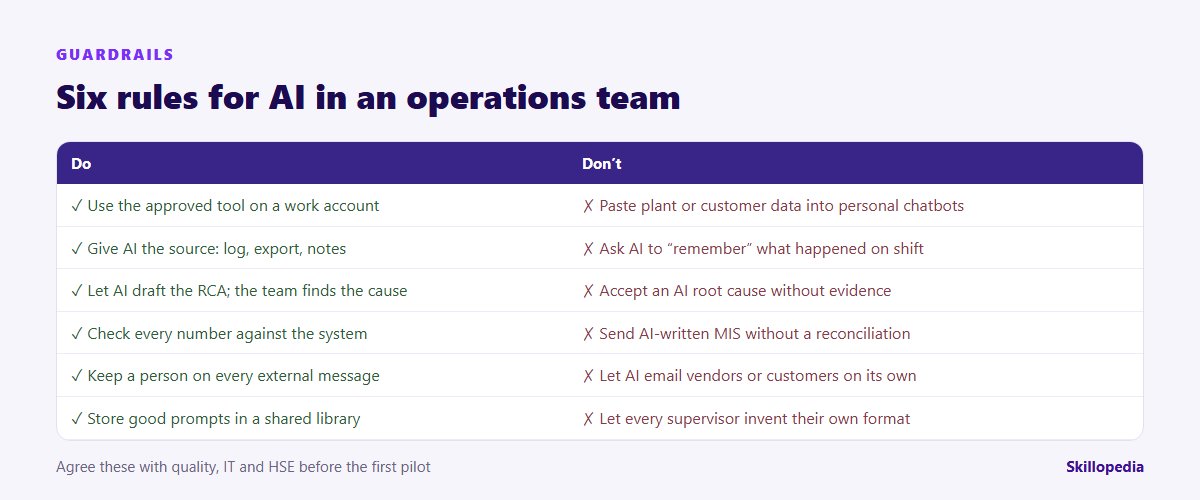
Three risks deserve special attention in operations:
- Safety-critical content. Lock-out and tag-out steps, permits to work, chemical handling and similar procedures need the same expert review and sign-off whether or not AI helped draft them.
- Confident errors in numbers. AI can misread tables and mix up periods. Ask it to quote figures from the source, and reconcile before anything is published.
- Instructions hidden in documents. A supplier document or email can contain text aimed at the AI rather than the reader. This is called prompt injection. It is one more reason to treat AI output as a draft, and to keep agent tools away from systems where they could act on their own.
Rolling AI out across operations
Individual supervisors experimenting is a start, not a rollout. A firm-level approach usually has four phases:
- Choose the workflows. Pick three or four of the eight above that matter most for your sites, using a simple scoring exercise. Agree the data rules once, for everyone.
- Train by role. Supervisors, planners, quality engineers and managers use AI differently. Train each group on its own documents, not generic examples. A short AI skills gap analysis shows where each group starts.
- Standardise. Build a shared prompt library with your templates, appoint one champion per site or shift, and make the handover and incident formats the same everywhere.
- Measure and expand. Re-time the baseline tasks at 30, 60 and 90 days, review corrections people had to make, and only then add new workflows or agent tools.
If your organisation is introducing Microsoft Copilot, the permission and licence decisions in our Copilot rollout plan should come before any site starts. Everyone, including shift staff who will only read AI-assisted documents, should understand the basics of safe use; our guide to AI literacy training for employees sets out what that means.
How to measure whether it is working
- Minutes per handover, SOP revision, incident report and MIS pack, against the baseline.
- SOP backlog: the number of procedures overdue for review.
- Average age of open vendor follow-ups and inventory exceptions.
- Corrections needed per AI draft, as a proxy for quality.
- Weekly active users among the people trained.
Be careful about claiming downstream savings such as less downtime or fewer complaints; they have many causes. Our guide on measuring the ROI of AI training explains how to keep the figures defensible.
Common mistakes
- Starting with the most complex problem. Begin with handovers or MIS commentary, not predictive maintenance.
- Letting AI write the root cause. It will produce a plausible one. Plausible is not proven.
- Every supervisor with a different prompt. Without shared templates, you get faster inconsistency.
- Skipping the baseline. Six weeks later, nobody can prove the time saved.
- Forgetting the frontline. Customer-facing operations teams have their own needs; see our guide on how to use AI in customer service.
30-day starter checklist
- Week 1: confirm the approved tool and data rules; time three or four baseline tasks; agree the handover and incident templates.
- Week 2: pilot handovers and SOP drafts with two supervisors per shift; save the prompts that work.
- Week 3: add vendor follow-ups and MIS commentary; review every AI draft against its source.
- Week 4: re-time the baseline tasks, list the corrections made, and decide what becomes standard practice across sites.