
How to Identify AI Use Cases: A Scoring Method, Matrix and Template
Why most AI use-case lists go wrong
Ask a room of managers for AI ideas and you will get a long list within minutes. The trouble starts when you try to act on it. The common failure patterns look like this:
- Tool first, problem second. “We should use agents” is not a use case. Nobody can say what it will replace, save or improve.
- Too big to test. “Use AI in customer service” covers fifty tasks. You cannot pilot a department; you can pilot one task.
- The loudest voice wins. Without agreed criteria, the idea from the most senior person goes first, whether or not it is the best one.
- No baseline. If nobody timed the task before AI, nobody can prove afterwards that anything improved.
- Risk discovered late. A promising pilot is stopped in week five because it used personal data nobody checked.
The fix is to separate two jobs that usually get mixed up. Discovery finds candidate use cases by looking closely at the work. Prioritisation chooses which few to pilot, using criteria everyone agreed in advance. The eight steps below cover both.
Step 1: Set the scope and get the right people in the room
Pick one department or one process family, not the whole company. A finance close, an HR operations team, a customer support desk or a sales operations group are all good sizes. Then invite six to eight people:
- Two or three people who do the work every day. They know where the time really goes.
- The manager who owns the results of that team.
- Someone from IT or data who knows which tools are approved and what systems hold the inputs.
- Someone who can speak for risk: compliance, legal, information security or HR, depending on the work.
Ninety minutes is enough for the first session. Before it, make sure everyone has a basic shared understanding of what today’s AI assistants can and cannot do. If that is missing, the ideas will swing between science fiction and spell-checking. Our guide to AI literacy training for employees covers the minimum everyone should know.
Step 2: Build a workflow inventory
Do not ask “Where could we use AI?” Ask “What do you spend your week doing?” Write each recurring task as one row in a simple table:
| Task | Who does it | How often | Time each time | Inputs | Output | Pain |
|---|---|---|---|---|---|---|
| Write job descriptions | Recruiters | 12 a month | 90 min | Manager notes, old JDs | JD in template | Back-and-forth with managers |
| Answer policy questions | HR helpdesk | ~40 a week | 10 min | Handbook, policies | Email reply | Same questions again and again |
Aim for 20 to 40 rows. Rough estimates are fine at this stage; you will measure properly later for the few tasks you pilot. If people find it hard to list tasks, ask them to talk through last Tuesday hour by hour, or to open their sent emails and calendar from the past week.
You can use an AI assistant to tidy the raw notes from the session into this table:
Step 3: Spot the AI-shaped work
Now go down the inventory and mark each task that matches one of the patterns where today’s generative AI tools are genuinely strong:
- Read and summarise: long documents, email threads, meeting transcripts, ticket histories.
- Draft from a pattern: first drafts of emails, reports, job descriptions, SOPs, proposals, using your template.
- Compare and check: a document against a checklist, a policy, a standard contract or another version.
- Extract and structure: pull fields from PDFs, quotes, forms or free text into a table.
- Classify and route: sort requests, complaints or feedback by topic, urgency or owner.
- Explain data: write the commentary on a spreadsheet or report that a person has already checked.
Then apply one honest filter: is this an AI problem at all? Some tasks are slow because of a broken process, a missing approval rule or a report nobody reads. Others are better solved with ordinary automation, such as a form, a workflow rule or a scheduled export. If the task follows fixed rules with no judgement or language involved, plain automation is usually cheaper and more reliable. Mark those separately; they are still worth fixing, just not with AI.
Step 4: Write each candidate as a use-case card
A use case is only testable when it is specific. Write each candidate in one sentence using this pattern:
For example: “When a hiring manager approves a new role, the recruiter uses AI to draft a job description from the manager’s notes and our JD template, which the recruiter edits and the hiring manager approves before posting.” Writing the last two parts forces the question of who checks the output, which is where most risk sits.
Ask an assistant to help convert your shortlisted tasks into cards, and to challenge them:
Step 5: Score each use case on four dimensions
Now the prioritisation begins. Score every card from 1 to 5 on four dimensions. Most published frameworks, from consultancies to vendors, use some version of value and feasibility; for AI it is worth separating out data readiness and risk, because those are what usually stop a pilot halfway.
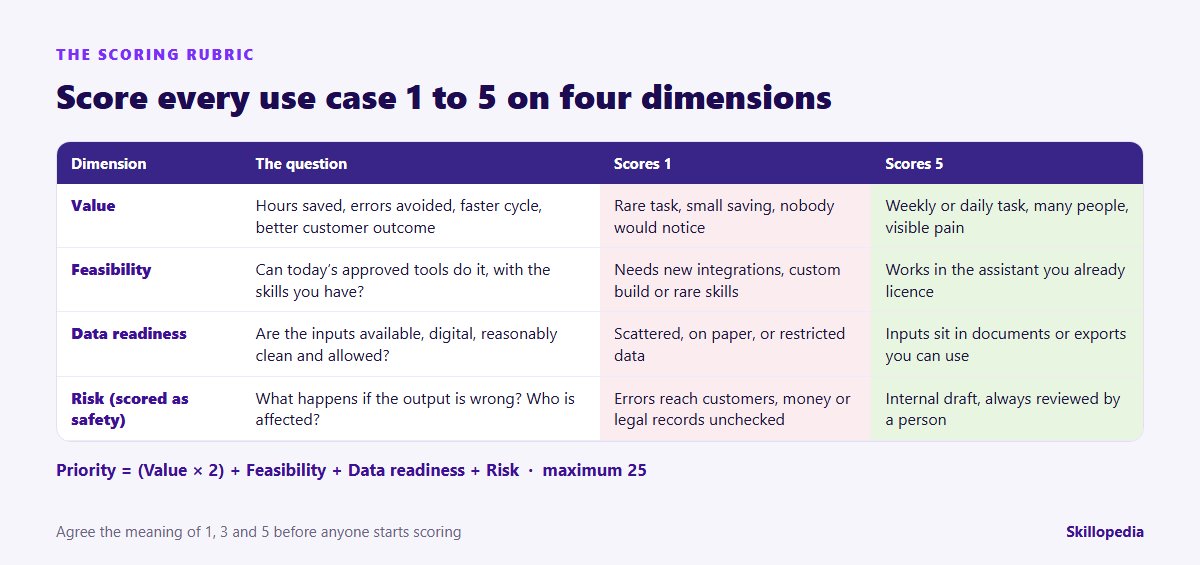
- Value (1–5): time saved across all the people who do the task, errors avoided, faster turnaround, better experience for customers or staff. A daily task done by twenty people beats a quarterly task done by one.
- Feasibility (1–5): can the AI tools you already have approved do this, with the skills your people have or can learn in a few weeks? A 5 works in your licensed assistant today. A 1 needs a custom build, new integrations or skills you do not have.
- Data readiness (1–5): are the inputs digital, reachable, reasonably clean and allowed to go into the tool? A 1 means paper files, scattered spreadsheets or data your policy does not permit.
- Risk, scored as safety (1–5): what happens if the output is wrong? A 5 is an internal draft that a person always reviews. A 1 means errors could reach customers, money, legal records or decisions about people without a check.
Combine them with a simple formula: Priority = (Value × 2) + Feasibility + Data readiness + Risk, out of 25. Doubling value stops easy-but-pointless ideas from floating to the top. Add two gates that override the score: any use case scoring 1 on risk or 1 on data readiness does not go to pilot until that is fixed, however high its total.
Score as a group, not alone. Have each person score privately first, then discuss only the cards where scores differ by two points or more. The discussion is often more useful than the number, because it exposes assumptions such as “I thought that data was in the CRM” or “Legal will never allow that”.
Step 6: Plot the shortlist on a prioritisation matrix
A total score is useful for sorting, but it hides the shape of the choice. Plot each use case on a two-by-two grid: value on the vertical axis, and ease (the average of feasibility and data readiness) on the horizontal. Show high-risk items with a different colour.
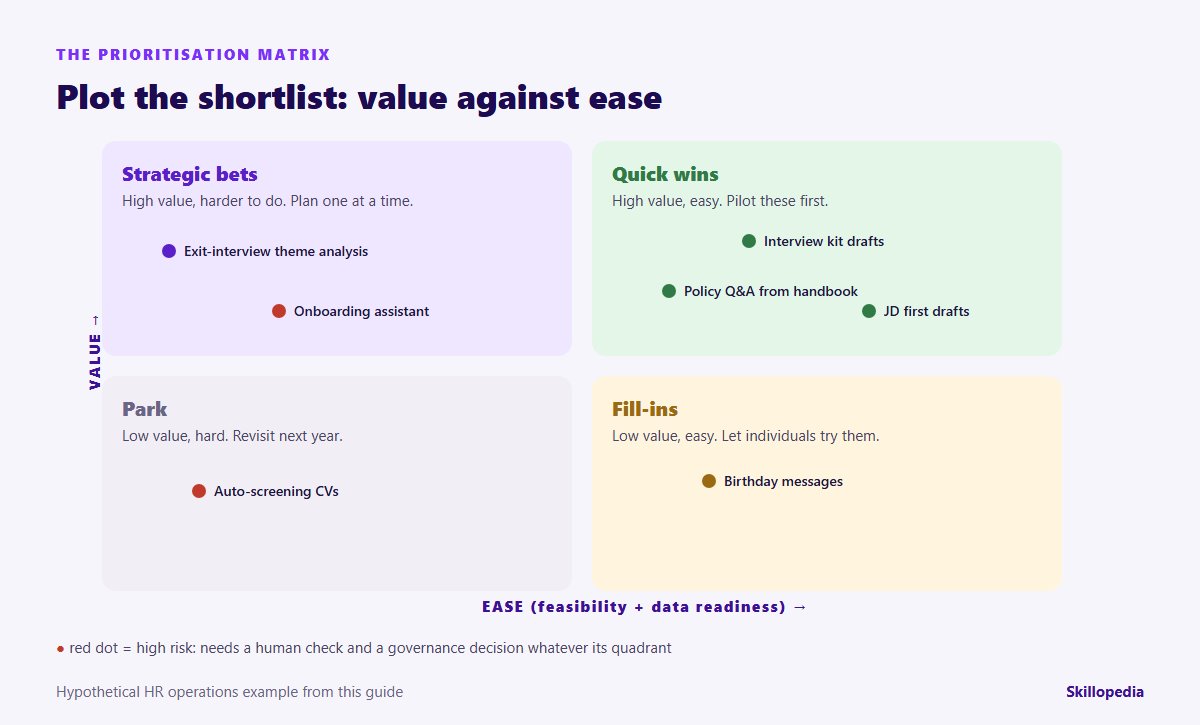
- Quick wins (high value, easy): pilot these first. They build confidence and teach people how to work with AI.
- Strategic bets (high value, harder): worth doing, but they need data work, integration or a policy decision. Run one at a time, with a sponsor.
- Fill-ins (low value, easy): let individuals use them if they like, but do not spend project effort on them.
- Park (low value, hard): write them down and revisit in six to twelve months, when tools or data may have changed.
Want this done with your own teams, not on a whiteboard?
Step 7: Choose a balanced portfolio
From the matrix, pick two or three quick wins and at most one strategic bet for the next quarter. That mix gives you visible results within weeks while the harder piece of work gets the attention it needs. Resist the urge to launch ten pilots at once; spreading a small team across many proofs of concept looks busy and rarely produces anything that gets adopted.
Also check that your choices are spread sensibly: not all in one person’s area, not all depending on the same overstretched IT contact, and at least one that a large number of people will feel. If the people who will use the tools lack the skills, run a quick AI skills gap analysis for the pilot group so training goes where it is needed.
Step 8: Design the pilot with a baseline and a decision date
Each chosen use case gets a one-page pilot charter. Keep it short enough that people actually read it.
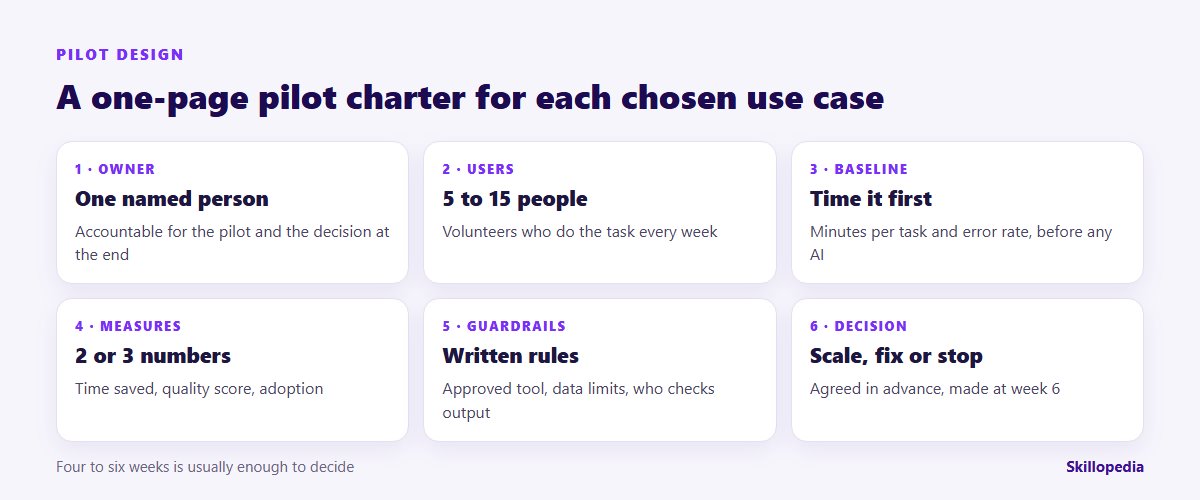
- Owner: one named person accountable for the pilot and the final recommendation.
- Users: five to fifteen people who do the task regularly and volunteered.
- Baseline: time per task, error or rework rate and volume, measured for one to two weeks before AI is introduced.
- Success measures: two or three numbers, for example minutes per task, share of drafts accepted with only minor edits, and weekly active users.
- Guardrails: the approved tool and account, what data may and may not be used, who reviews output, and what never goes out without a human check.
- Decision rule: what result means scale, what means fix and retry, and what means stop. Write it down in advance, for example: “Scale if time per task falls by at least a third with no rise in errors.”
Four to six weeks is usually enough for a quick win. A pilot that has not shown anything after eight weeks rarely recovers. If your organisation is rolling out Microsoft Copilot, our Copilot rollout plan shows how to fit pilots like these into licensing and permission decisions.
Leaders who want to build their own depth after the first session can compare AI courses for managers and business leaders in India.
An assistant can draft the charter for you from the use-case card:
A worked example: an HR operations team
Here is a hypothetical example to show how the method works end to end. Imagine the HR operations team of a services company with about 1,200 employees. Eight people ran the workshop; the inventory produced 31 tasks; 11 matched an AI pattern; seven survived the “is this really AI?” filter and became cards. Their scores:
| Use case | Value | Feasibility | Data | Risk (safety) | Priority /25 | Decision |
|---|---|---|---|---|---|---|
| Job description first drafts | 4 | 5 | 5 | 4 | 22 | Quick win: pilot |
| Structured interview kit drafts | 4 | 5 | 4 | 4 | 21 | Quick win: pilot |
| Policy Q&A drafts from the handbook | 4 | 4 | 4 | 3 | 19 | Quick win: pilot with review |
| Birthday and work-anniversary messages | 1 | 5 | 5 | 5 | 17 | Fill-in: individuals only |
| Exit-interview theme analysis | 4 | 3 | 2 | 3 | 16 | Strategic bet: fix data first |
| New-joiner onboarding assistant | 4 | 2 | 3 | 2 | 15 | Later: after Q&A pilot |
| Automatic CV screening and rejection | 3 | 2 | 3 | 1 | 12 | Gate fails: park |
Three lessons from the example. First, the birthday messages scored 17, higher than exit-interview analysis, because they are trivially easy; the matrix shows them for what they are, a fill-in. Second, the onboarding assistant is valuable but depends on the policy Q&A work, so it waits for that pilot to prove the content is reliable. Third, automatic CV rejection failed the risk gate: decisions about people should not be made by AI without human review, and the team instead kept a narrower idea, AI summaries of each CV against written criteria, for a recruiter to read. Our guide on how to use AI in recruitment explains that approach.
The team chose JD drafts, interview kits and policy Q&A as the quarter’s quick wins, and exit-interview analysis as the one bet, starting with a data clean-up of three years of free-text forms.
The template: copy it into a spreadsheet
Set up one sheet with these columns and you have everything the method needs:
- ID
- Use-case card (the one-sentence format from Step 4)
- Team and owner
- Volume (times per month) and time per occurrence
- AI pattern (summarise, draft, compare, extract, classify, explain)
- Value score 1–5, with a one-line reason
- Feasibility score 1–5, with a reason
- Data readiness score 1–5, with a reason
- Risk (safety) score 1–5, with a reason
- Priority = (Value × 2) + Feasibility + Data + Risk
- Gate passed? (yes / no, and why)
- Quadrant (quick win, bet, fill-in, park)
- Decision and next review date
The reason columns matter more than they look. Six months later, when tools have improved or a data project has finished, they tell you exactly which parked ideas deserve a second look.
Common mistakes to avoid
- Scoring in the abstract. “Value: high” means nothing. Tie each score to volume and minutes, even rough ones.
- Letting the vendor run discovery. A tool supplier will naturally find use cases for its tool. Start from the work, then choose the tool.
- Ignoring the people who do the job. Managers often guess wrongly about where time goes. The people doing the task know.
- Treating every idea as a chatbot. Many of the best use cases are a well-written prompt used by a trained person, not a new system.
- Counting licences instead of outcomes. Adoption matters, but the measure that convinces a finance director is time or quality on a named task. Our guide to measuring the ROI of AI training shows how to keep those figures honest.
- Never revisiting the list. AI tools change quickly. Re-score parked ideas every six months.
Quick checklist
- One department or process in scope, with doers, a manager, IT and risk in the room
- A workflow inventory of 20 to 40 recurring tasks with rough volume and time
- Each task checked against the six AI patterns and the “is this really AI?” filter
- Candidates written as one-sentence use-case cards, including who checks the output
- Scores agreed for value, feasibility, data readiness and risk, with reasons
- Gates applied: no pilot with a 1 on risk or data
- Matrix plotted; two or three quick wins and at most one bet chosen
- A one-page pilot charter with baseline, measures, guardrails and a decision rule
- A review date for everything parked
Smaller firms can run the whole method in an afternoon with three or four people; our guide to AI for small businesses has examples of the tasks that usually come out on top.